
Connecting Google Analytics, Meta and TikTok
Your storefront now supports direct integration with Google Analytics, Meta and TikTok. This allows you to track visits, conversions and customer behaviour across all voucher pages. Setup is straightforward and gives you deeper insight into performance.
You can find all tracking options in:
Store Settings: Third-Party Tracking
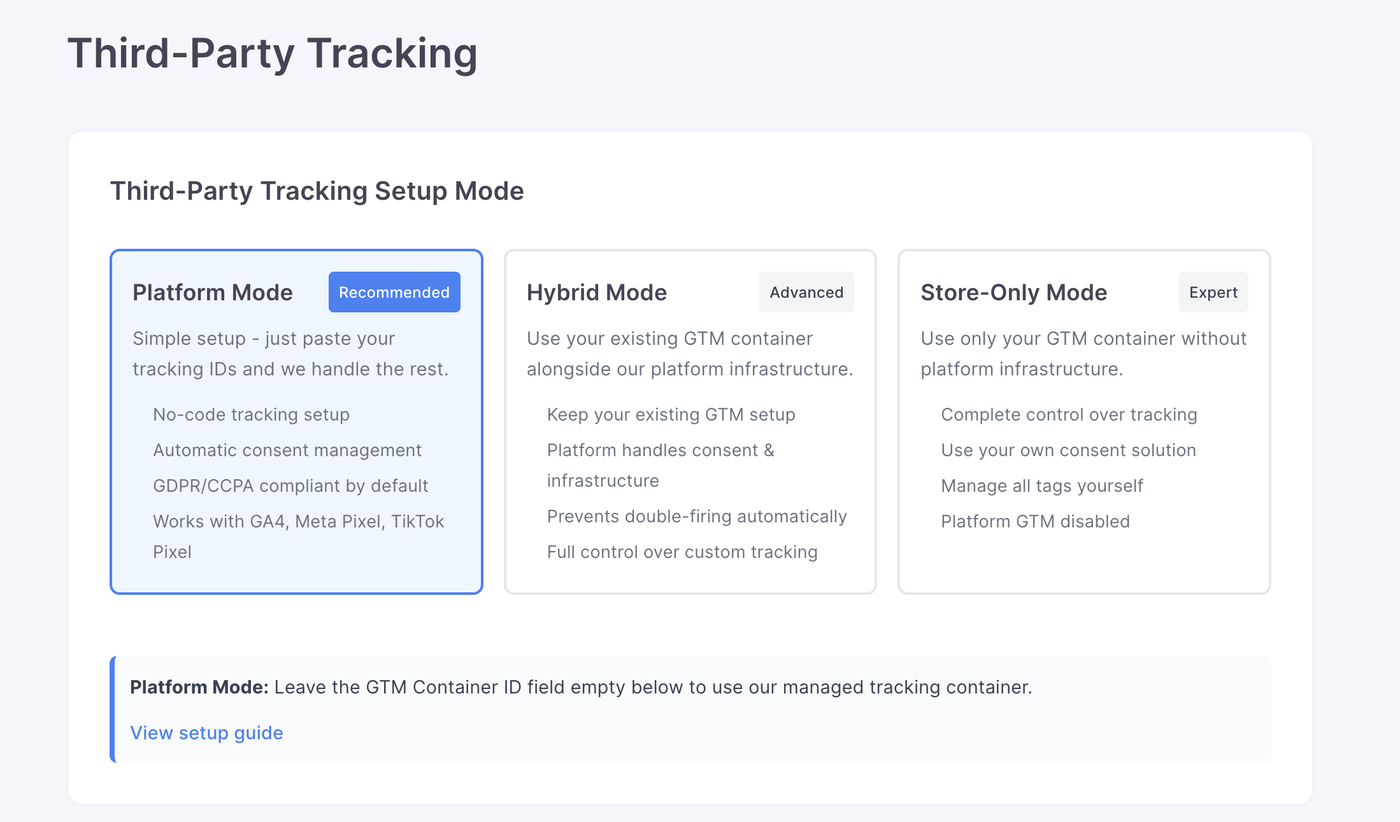
Platform Mode
Simple setup
Platform Mode is the easiest way to connect your storefront to Google Analytics, Meta and TikTok. You only need to paste your tracking IDs into the relevant fields, and the platform handles everything else.
Key benefits
• No-code tracking setup
• Automatic consent management
• GDPR and CCPA compliant by default
• Works with GA4, Meta Pixel and TikTok Pixel
• Reliable tracking with no risk of duplicate firing
• Ideal for storefronts that want a strong analytics setup without technical work
How it works
The platform injects and manages all required tracking scripts and events, including consent logic and infrastructure-level support.
Hybrid Mode
Advanced users
Hybrid Mode lets you keep your existing Google Tag Manager (GTM) container and combine it with the platform’s built-in tracking infrastructure.
How it works
Your GTM container runs alongside platform tracking. The platform manages consent and prevents double-firing, while your GTM container handles your more complex or custom requirements.
Best for
• Stores already using GTM
• Businesses needing custom events or additional tags
• Teams that want control over GTM while still benefiting from platform-level stability
What the platform handles
• Consent management
• Tracking infrastructure
• Prevention of duplicate firing
• Core visitor tracking events
What you control
• Your GTM container
• Custom tracking tags
• Additional triggers or events
Store-Only Mode
Expert users
Store-Only Mode is for teams that want full control over every aspect of tracking. In this mode, the platform disables all of its tracking tools.
How it works
Your GTM container becomes the single source of tracking code. Nothing from the platform is injected, and all tags, triggers and consent handling are your responsibility.
Best for
• Organisations with established analytics teams
• Advanced setups using their own consent tools
• Stores wanting complete autonomy over tracking
In this mode
• Platform GTM is disabled
• You manage all tags yourself
• No automatic consent handling
• You must ensure your tracking meets GDPR and CCPA requirements.
Mode | Experience Level | Best For | Platform Handles | You Handle |
|---|---|---|---|---|
Platform Mode | Beginner or general user | Most storefronts | Consent, infrastructure, tracking scripts | Tracking IDs |
Hybrid Mode | Advanced | Stores with an existing GTM setup | Consent, infrastructure, duplicate prevention | Custom GTM tags |
Store-Only Mode | Expert | Full custom analytics environments | Nothing | All tracking and consent |
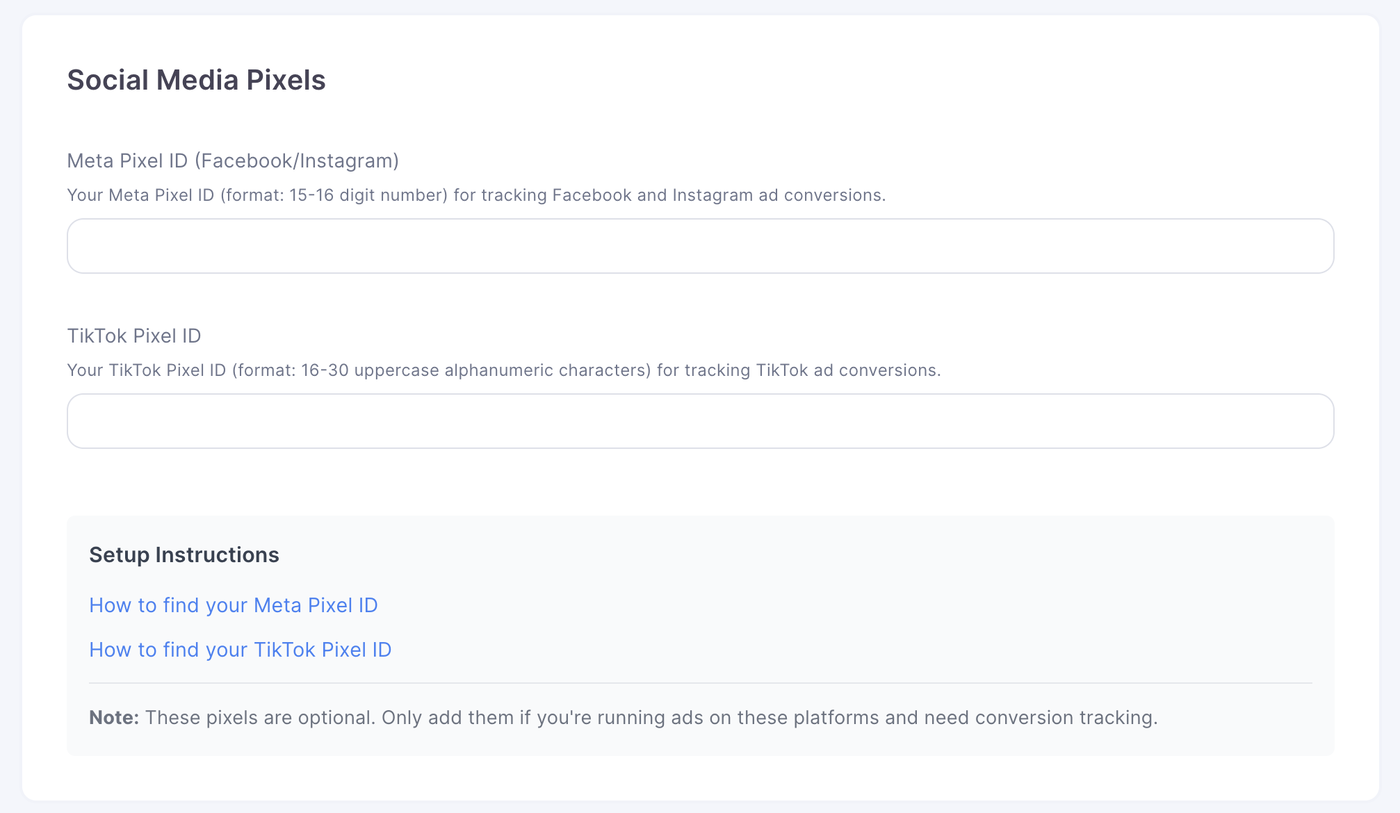
To connect your various analytics accounts, simply add in your ID from the various platforms,
Note: if you wish to use our platform mode, leave the Google Tag Manager Container ID empty on the google analytics one.
If you are looking to do Hybrid or Store only mode you will need to configure it yourself. Please see our full guide here:GTM schema documentation
Privacy and Consent
Because third-party tracking tools are used on your storefront, a consent banner is required for regions that enforce privacy regulations. This ensures that tracking is only activated after the visitor gives explicit permission.
For countries, states and territories with applicable privacy laws, you can enable a pop up that appears when a user first visits the store. This pop up asks for consent before the user continues browsing. The banner automatically manages tracking permissions, so tools like Google Analytics, Meta Pixel and TikTok Pixel will only run once consent has been granted.
If you need help configuring the consent banner or understanding which regions require it, feel free to ask.
